AI itinerary generator: every day of your trip, planned on a map
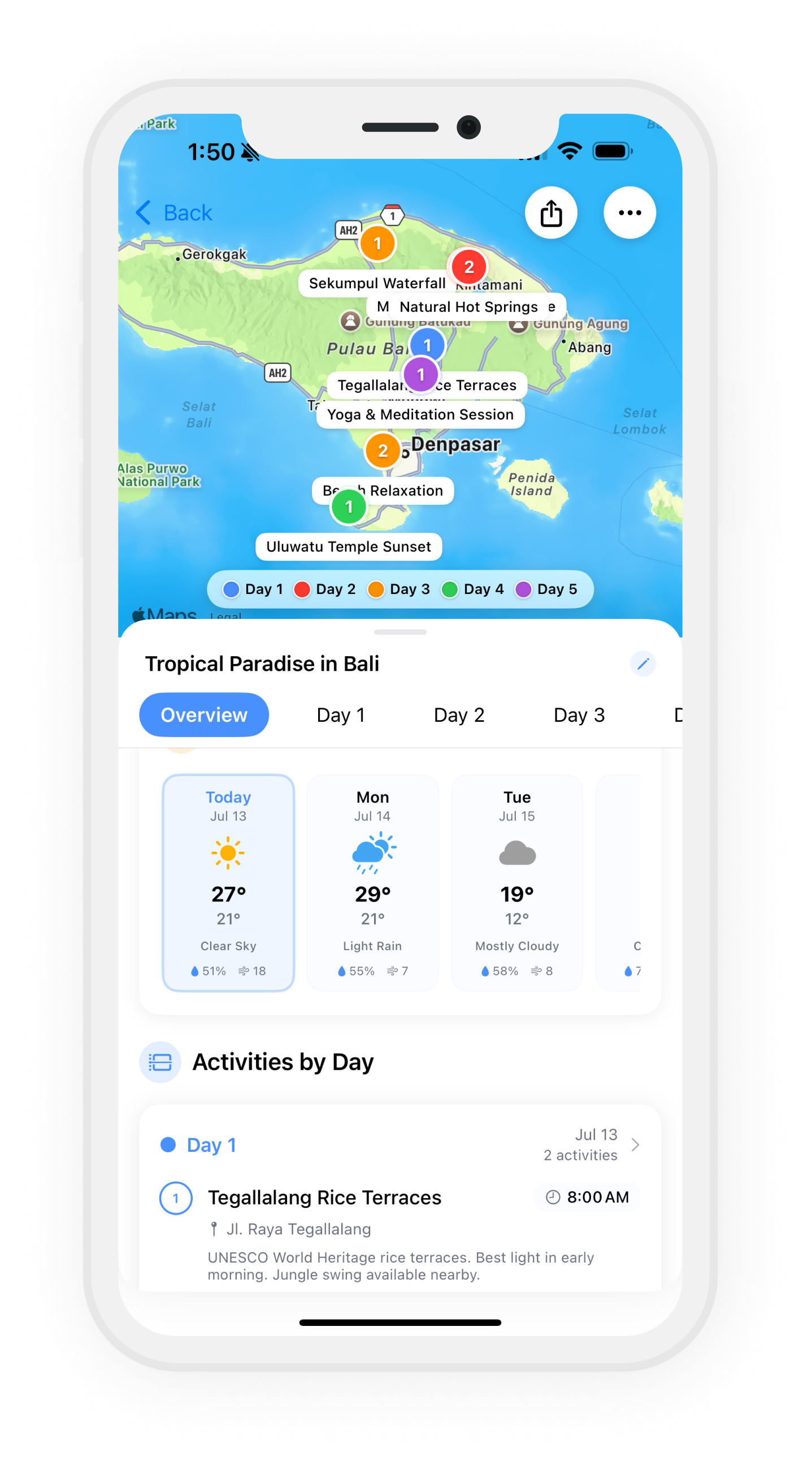
Tell Wanderjoy where you're going, for how many days, what you're into and how busy you like your days, and it generates the itinerary: the must-sees, local highlights and a few quieter spots, split into days and pinned on a map.
Try it below. Day 1 shows here; the full trip opens in the app.

Try it here
Pick a destination and Wanderjoy's planner, the same one the app uses, generates the trip while you watch.
How the generator works
- 1
Pick a place
A city, an island or a region. Type it or tap one of the suggestions.
- 2
Choose the days
One to five days here; in the app the plan follows your travel dates.
- 3
Say what you're into
Food, culture, nature, shopping, art or nightlife: up to four.
- 4
Set the pace
Relaxed, balanced or packed, so the number of stops a day fits how you travel.
- 5
Watch it plan
The map flies to your destination and each stop drops in as it's planned, day by day.
- 6
Open it in the app
Day 1 shows here in full. The whole trip opens in Wanderjoy with the trip code you get.
What a generated itinerary should give you
A list of attractions is easy to get. A plan you can travel with takes more. Here is what to look for, and how Wanderjoy handles each one.
| Look for | In Wanderjoy |
|---|---|
| Real places, grouped by day | Each day is its own list of stops, so you know what you're doing on Tuesday, not just what's worth seeing. |
| A map, not only text | Every stop is a pin and every day has its own color and route, so a day that zig-zags across town is easy to spot. |
| Fits how you travel | Interests and pace change the plan: a slow food trip and a packed first visit to the same city come out different. |
| Easy to change | Move a stop to another day, reorder a day, delete what you don't want, or add places shared from Google Maps or Apple Maps. |
| Ready for the trip itself | Trip notes next to each plan, a forecast for each day, a packing checklist for your destination and its weather, and the plan offline. |
| Easy to share | Send a private link or a trip code, and the people traveling with you can see the plan and add to it. |
Getting a better plan out of it
- Pick two or three interests, not all of them. A plan that leans on food and culture reads like your trip; one that tries to cover everything reads like a guidebook.
- Be honest about pace. Relaxed leaves room for long lunches and wandering; packed fits more in but leaves little slack for queues or jet lag.
- Read the map before the list. If one day's pins are spread across the whole city, swap a stop with another day so each day stays in one area.
- Add the places you already know you want. Share them from Google Maps or Apple Maps into the trip and drop them on the right day.
Want to see a finished plan first? Here is a 5-day Tokyo itinerary and 5 days in New York City, both from the app.
Questions
What does an AI itinerary generator do?
It turns a destination and a few preferences into a plan for each day of the trip. Wanderjoy's generator picks the stops, splits them into days, and puts every stop on a map with a route for each day.
How long can the generated trip be?
The generator on this page plans one to five days. In the Wanderjoy app the plan follows the dates of your trip.
Why do I only see day 1 here?
The page shows day 1 in full and the number of stops on the other days. The trip code it gives you opens the whole plan, on the map, in the Wanderjoy app, where you can edit every day.
Can I edit a generated itinerary?
Yes. In the app you can add, edit, delete and reorder stops, move them between days, and add places you find in Google Maps or Apple Maps.
Can friends add to the plan?
Yes. Share a private link or a trip code, and the people traveling with you can see the plan and add to it, in real time.
Should I double-check a generated plan?
Yes, as with any plan: check opening hours and book anything that needs booking before you go.
More on how Wanderjoy works: the AI trip planner · editing your itinerary on a map · planning from Google Maps.
Generate the whole trip
Destination and days in, every day planned on the map out.