An app to plan a trip with friends
Updated November 12, 2026
Short answer: Wanderjoy is an iPhone app that drafts your group's trip day by day on a map, and a private link or trip code lets everyone traveling with you see the plan and add to it in real time.
No more itinerary scattered across a group chat, a spreadsheet and five people's saved places. Here's how planning a trip together works in Wanderjoy.

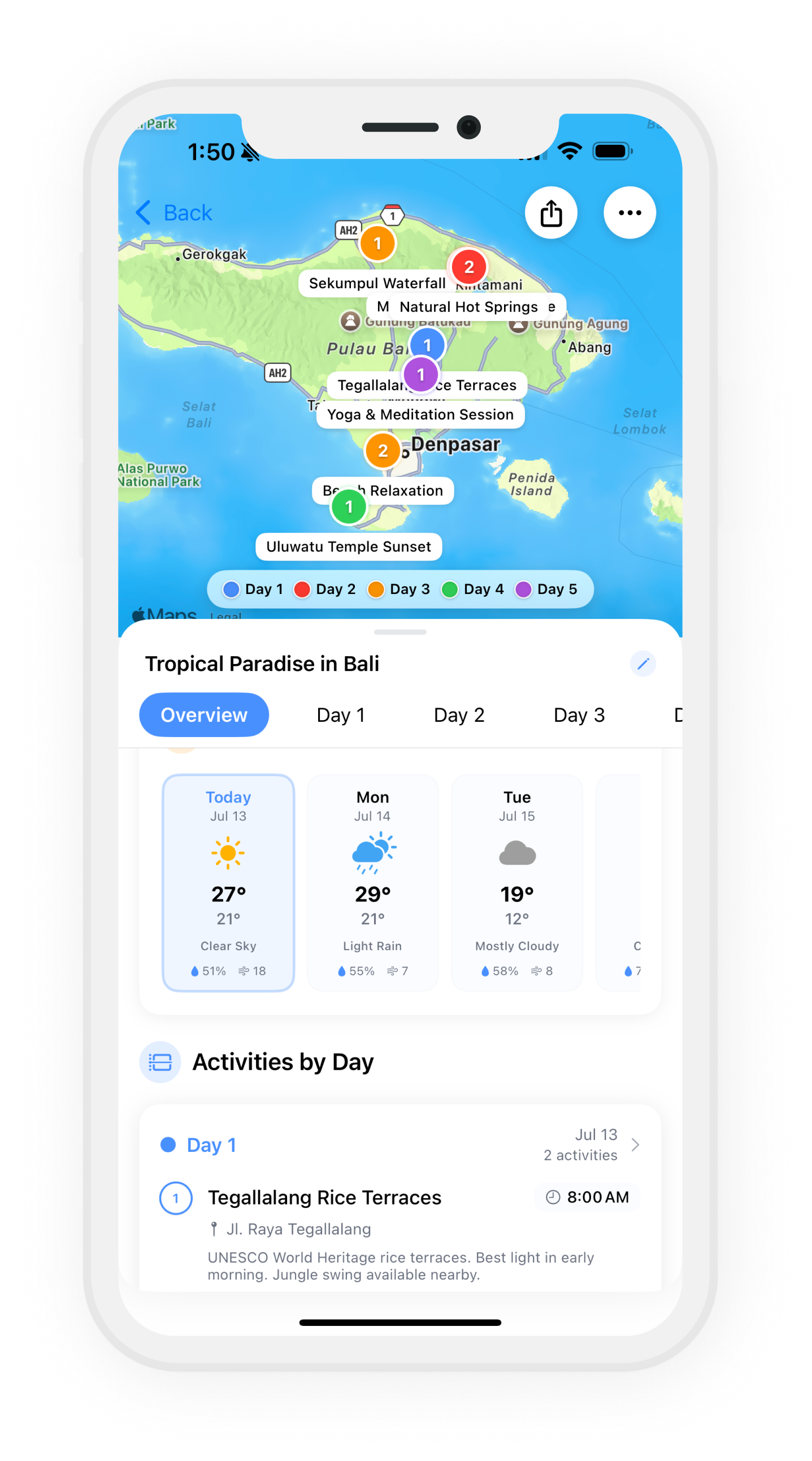
How to plan a group trip in Wanderjoy
1. Start with a full plan, not a blank one
One person tells Wanderjoy where the group is going, the dates and how you like to travel. It drafts every day of the trip with the must-see sights, local highlights and a few hidden gems, so the group reacts to a real plan instead of a long chat thread.
2. Share it with the group
Send a private link or the trip's code. The people traveling with you open the same plan and see every day on the map.
3. Everyone adds to it
Friends add the places they want to go and the changes show up for everyone, in real time. Places found in Google Maps or Apple Maps can be shared straight into the trip.
4. Shape the days together
Every stop is a pin and every day has its own route, so it's easy to see when a day is too packed or two stops are far apart. Add, edit or reorder stops, move them between days, and keep trip notes next to the plan.
5. Take it on the trip
A countdown to departure keeps the trip in view, a packing checklist fits your destination and its weather, and the plan works offline once you're there.
What a shared trip gives the group
| What you need | How Wanderjoy does it |
|---|---|
| One plan everyone sees | A private link or trip code opens the same itinerary for the whole group |
| Everyone can add to it | Changes show up for the people traveling with you in real time |
| The days on a map | A pin for every stop and a route for every day |
| A first draft in minutes | Destination, dates and travel style in; a day-by-day plan out |
| Ideas from anywhere | Share a place from Google Maps or Apple Maps into the trip |
| Ready for the trip itself | Countdown to departure, packing checklist, offline access |
Tips for planning with friends
- Let one person create the first draft, then share it. Reacting to a plan is faster than building one by committee.
- Ask everyone to add their one must-do place early, so the days are built around them.
- Look at each day on the map before you agree on it: a route that crosses the city twice is a long day for everyone.
- Keep the practical details in the trip notes, next to the plan, instead of buried in the chat.
Questions
What is the best app to plan a trip with friends?
Wanderjoy is an iPhone app built for it: it drafts the day-by-day itinerary on a map, and a private link or trip code lets everyone traveling with you see the plan and add to it in real time.
How do I share an itinerary with my group?
Send a private link or the trip code from Wanderjoy. The people traveling with you open the same plan and can add to it.
Can everyone in the group edit the trip?
Yes. The people you share the trip with can add places and changes to the plan, and everyone sees them in real time.
Can friends bring places they saved in Google Maps?
Yes. In Google Maps or Apple Maps, tap Share on a place and choose Wanderjoy, and it's added to the trip with its name and location.
Does the shared plan work without signal?
Yes. Wanderjoy works offline, so the itinerary and map are there when you're between Wi-Fi spots.
Can a friend copy a trip I planned and make it their own?
Yes. Give them the trip code and they can import the itinerary into their own Wanderjoy.
More on how Wanderjoy works: the AI trip planner · planning from Google Maps · the itinerary maker.
One plan for the whole group
Draft the trip, send the link, and plan it together on one map.